

EZPass Virginia is the official electronic toll system used across the Commonwealth of Virginia. It lets drivers move through toll roads, bridges, and tunnels without stopping to pay cash. A small transponder mounted on your windshield talks to overhead sensors and deducts the correct toll from a prepaid account. The same transponder works on toll roads in 18 other states, so one device covers most East Coast travel. This page covers every part of the EZPass Virginia system, from your first login and account setup to ordering a new transponder, paying bills online, handling violations, and avoiding scams.
The Virginia Department of Transportation runs the system through a customer service center based in Richmond. The center processes new accounts, payments, and transponder orders seven days a week. Drivers can manage their accounts online at ezpassva.com, by phone, in person at service centers, or through retail partners like grocery stores and DMV offices. The system supports personal accounts, business accounts, and a Flex account that switches between solo toll payment and free high-occupancy travel on Express Lanes.
EZPass VA Login: Reach and Use Your Account
The EZPass VA login opens the door to your full account. Once you log in, you can check your balance, view recent trips, add money, update vehicle plates, change payment methods, and download past statements. The login page lives at myaccount.ezpassva.com, which is the only official address for Virginia EZPass account holders.
Your username is the email address you provided during signup. Your password is one you created at that time. Passwords are case-sensitive, which means capital letters and small letters must match exactly. If you have not signed up yet, the next section walks through the full registration process. If you already have an account, the actions below will get you logged in.
Action 1: Open the Official Login Page
Open a web browser such as Chrome, Firefox, Safari, or Edge. Type ezpassva.com into the address bar and press Enter. The homepage loads with the Virginia EZ-Pass logo and a menu bar. Click the “Log In” link at the top right corner. The site sends you to myaccount.ezpassva.com, where you see two empty boxes: one for username and one for password.

Action 2: Type Your Credentials and Sign In
Type your registered email address in the username box. Type your password in the password box. Make sure Caps Lock is turned off on your keyboard. Click the “Sign In” button. A green success message appears, and the page reloads to your account dashboard. The dashboard shows your current balance, a list of recent tolls, vehicle plates on file, and payment method details.
Action 3: Recover Access When You Cannot Log In
Click the “Forgot Username or Password?” link on the login page. The site asks for the email address tied to your account. Type it and click “Submit.” A reset email arrives within five minutes. Open the email, click the link inside, and create a new password with at least 8 characters, mixing letters, numbers, and symbols. Save the new password in a password manager so you do not forget it again.
https://myaccount.ezpassva.com/Home/Login?ReturnUrl=%2f
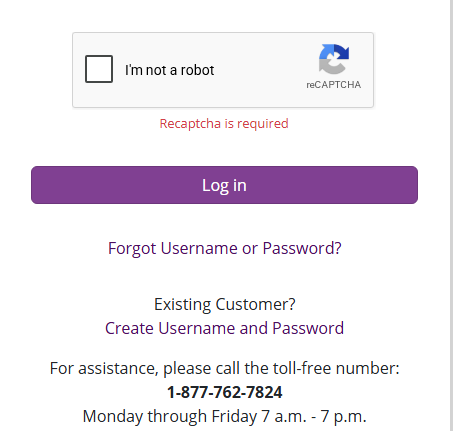
If the reset email does not arrive, check your spam or junk folder. Some email providers flag automated messages as spam. If you still see nothing, call 1-877-762-7824 to verify the email on file and request a manual reset from a customer service agent.
How to Sign Up for EZ-Pass VA
New drivers need to open an EZPass account before they can use the toll roads. The signup process takes about 10 minutes and requires a valid email address, a payment method, and your vehicle plate number. You can complete the signup online, at a retail store, or in person at a service center.
Action 1: Start Your Account Online
Open ezpassva.com in your browser. Click “Open a New Account” from the main menu. The signup wizard loads in a new page. Choose “Personal Account” if you drive for yourself. Choose “Business Account” if you manage a fleet of vehicles. Choose “Flex Account” if you plan to use Express Lanes and want free high-occupancy travel with two or more riders. Fill in your full legal name, home address, phone number, and email address. The email address becomes your username for the login page. Pick a password with at least 8 characters, mixing upper-case letters, lower-case letters, numbers, and symbols. Confirm the password by typing it a second time. Check the box to agree to the EZ-Pass Virginia terms of service and privacy policy.
Action 2: Add Your Vehicle and Payment Details
Enter the license plate number, plate state, vehicle make, vehicle model, and vehicle year for each car you want linked to the account. You can add up to 10 vehicles on a personal account and unlimited vehicles on a business account. Each vehicle must have a unique plate number registered to your name or business.
Action 3: Set Up Your Funding Plan
Manual top-ups let you add money to your account whenever you choose. Automatic replenishment adds money from your payment method whenever your balance drops below a set threshold. The default threshold is $10. When your balance falls below $10, the system charges your payment method $35 to refill your account. Set your preferred replenishment amount and threshold under “Payment Settings.” You can change these settings at any time from your account dashboard. The minimum opening balance is $10 for personal accounts and $25 for business accounts.
Action 4: Review, Submit, and Activate
Review every detail on the confirmation page. Make sure your name, address, plate numbers, and payment method are correct. Click “Submit” to create the account. A confirmation screen displays your new account number and a summary of your settings. A confirmation email arrives in your inbox within a few minutes. Save this email for your records. Your transponder ships free to your home address in 5 to 7 business days. The package includes the transponder, a mounting strip, and a printed instruction sheet. Mount the transponder on your windshield as soon as it arrives. The account is active the moment you submit the signup form, so even without a physical transponder, your plate is already registered for Pay-By-Plate billing.
EZ-Pass VA Login Issues
Login problems are rare, yet they happen to most drivers at some point. The most common issues include forgotten passwords, locked accounts, browser errors, and maintenance windows. Each problem has a clear fix that takes only a few minutes.
Forgot Password or Username
If you forgot your password, click “Forgot Username or Password?” on the login page. Enter the email address tied to your account and submit. The system emails you a reset link valid for 30 minutes. Click the link, type a new password, and log in with your updated credentials. If you forgot the email address on file, call 1-877-762-7824 with your account number or plate number ready. A customer service agent can look up your username after confirming your identity with your full name, address, and date of birth.
Account Locked After Too Many Attempts
Typing the wrong password three times in a row locks the account for 30 minutes. The lock protects your account from automated hacking tools that try thousands of password combinations per minute. Wait 30 minutes, then try again with the correct password. If you cannot remember the password, use the reset link instead of guessing more times.
Browser Errors and Cache Issues
Old cached files in your browser can block the login form from loading. Clear your browser cache by pressing Ctrl+Shift+Delete on Windows or Command+Shift+Delete on Mac. Select “Cached Images and Files” and clear them. Close the browser, reopen it, and try the login page again.
If the page still fails to load, try a different browser. Many login errors come from outdated browser extensions, especially ad blockers and privacy plugins. Disable all extensions and reload the login page.
Scheduled Maintenance Windows
The EZPass Virginia system goes offline for scheduled maintenance every Sunday between 2:00 AM and 4:00 AM ET. During this window, the login page shows a maintenance message. Wait for the window to end, then log in as normal. For unscheduled outages, follow the EZPass Virginia social media accounts for real-time updates.
Two-Factor Authentication Problems
Two-factor authentication adds a one-time code to the login process. The code arrives by text or email after you type your password. If you do not receive the code, check your phone signal and your email spam folder. Codes expire after 10 minutes, so request a fresh code if yours has expired.
Security Tips for E-ZPass VA Login
Your EZ-Pass VA account holds your payment details, your home address, and your vehicle plate numbers. A compromised account could lead to fraudulent charges, stolen personal data, or unauthorized transponder orders. Strong security habits keep your account safe from hackers and scammers.
Create a Strong, Unique Password
A strong password contains at least 12 characters with a mix of upper-case letters, lower-case letters, numbers, and symbols. Avoid common words like “password123” or your birth year. Never reuse passwords from other websites. If one site gets hacked, attackers try the same password on every other site you use. A password manager like Bitwarden, 1Password, or LastPass generates and stores strong passwords for you.
Enable Two-Factor Authentication
Two-factor authentication adds a second step to the login process. After typing your password, you must enter a one-time code sent to your phone or email. Even if a hacker steals your password, they cannot log in without the second code. Turn on two-factor authentication under “Security Settings” in your account dashboard.
Spot Phishing Emails and Fake Login Pages
Phishing emails pretend to be from EZ-Pass Virginia and ask you to click a link to “verify your account” or “fix a billing issue.” Real emails from EZPass Virginia come from addresses ending in “@ezpassva.com” and never ask for your password by email. If you receive a suspicious email, do not click any links. Forward the email to phishing@ezpassva.com and delete it.
Fake login pages look identical to the real portal but exist on fake URLs. Always check the address bar before typing your password. The only correct URL is myaccount.ezpassva.com. Bookmark this URL on your browser so you never land on a fake page by accident.
Monitor Your Account for Strange Activity
Check your account dashboard once a week for trips you did not take or charges you do not recognize. If you spot unusual activity, change your password right away and call customer service at 1-877-762-7824. Early detection stops fraud before it grows into a larger problem.
Log Out on Shared Devices
Always click the “Log Out” button when you finish using the account on a shared computer, library terminal, or someone else’s phone. The “Log Out” link sits in the top right corner of the dashboard. Logging out prevents the next person who uses the device from accessing your account.
Types of E-ZPass VA Accounts
EZ-Pass Virginia offers three main account types: Personal, Business, and Flex. Each type serves a different group of drivers, with features tuned to how you use Virginia toll roads. Picking the right account saves money and avoids hassles down the road.
Personal E-ZPass VA Account
A Personal account fits everyday drivers with one or two vehicles. You can add up to 10 vehicles, but most people use only one or two. The account includes one free standard transponder per vehicle, automatic replenishment, and access to all Virginia toll roads plus 18 other states.
Personal accounts cost nothing to open. You only pay the tolls you incur and the upfront transponder deposit. The deposit is $10 for a standard transponder and $15 for a Flex transponder. The deposit stays on your account as a balance credit and never expires.
Business E-ZPass VA Account
A Business account fits companies with fleets of vehicles, such as delivery services, plumbing companies, taxi firms, and rental car agencies. Business accounts support unlimited vehicles and unlimited transponders. Each vehicle gets its own transponder linked to the company account.
Business accounts include extra features like detailed expense reports, driver-level tracking, bulk payment options, and a dedicated account manager. Companies can set spending limits per vehicle, restrict toll road access by vehicle class, and export trip data to accounting software like QuickBooks.
The opening balance for a Business account is $25 per transponder. Most companies pay hundreds of dollars upfront to cover the initial transponder cost plus a starting balance. The monthly statement separates tolls by vehicle, making tax time and client billing much easier.
E-ZPass VA Flex Account
A Flex account is a Personal account with a Flex transponder that has a switch on top. The switch toggles between “HOV” mode and “toll” mode. In “HOV” mode with two or more riders, you can use the Express Lanes for free. In “toll” mode with one rider, you pay the standard Express Lanes toll.
Flex transponders cost $15 as a deposit, refundable when you return the device in good condition. The device mounts on the windshield just like a standard transponder. The switch on top slides between three positions: HOV (for free high-occupancy travel), toll (for standard toll payment), and off (for parking garages or car washes where the transponder should not read).
E-ZPass VA Benefits
EZ-Pass Virginia delivers real savings and convenience over cash or Pay-By-Plate billing. Drivers who use the system save up to 50% on Express Lanes tolls during peak hours and skip the higher administrative rates charged for unpaid tolls.
Cost Savings
Express Lanes tolls vary by traffic conditions. During rush hour, tolls can hit $20 or more for a short trip. EZPass Virginia users pay the posted toll with no extra fees. Pay-By-Plate users without an account pay the toll plus a $2.50 administrative fee per trip. Drivers who use the lanes every weekday save hundreds of dollars per year just by avoiding those fees.
Convenience and Time Savings
Toll booths slow traffic to a crawl. Electronic tolling with EZ-Pass Virginia keeps traffic flowing at highway speed. The transponder reads at 30 mph or higher, so you never brake for a toll booth. This shaves minutes off every trip and reduces stress on busy commutes. Online account management lets you handle every account task from home. Add a vehicle, change a payment method, download a statement, or dispute a charge without picking up the phone. The mobile-friendly website works on any phone with a browser, so you can manage your account from the road.
Access to Express Lanes
Express Lanes are high-occupancy toll lanes that run alongside regular highway lanes. They offer faster travel times during rush hour but charge variable tolls based on traffic. Solo drivers can use the lanes for a toll. Carpoolers with a Flex transponder in HOV mode use them for free. The I-66 Express Lanes inside the Beltway, the I-95 Express Lanes, the I-395 Express Lanes, the I-495 Express Lanes, and the I-64 Express Lanes in Norfolk all require EZPass Virginia or a compatible out-of-state transponder. Without a transponder, you pay Pay-By-Plate rates that are higher than EZPass rates.
Interoperability with Other States
Your Virginia Toll booths slow traffic to a crawl. Electronic tolling with EZ-PassVirginia keeps traffic flowing at highway speed. The transponder reads at 30 mph or higher, so you never brake for a toll booth. This shaves minutes off every trip and reduces stress on busy commutes.
works on toll roads in 18 other states, including Maine, New Hampshire, Massachusetts, Rhode Island, New York, New Jersey, Delaware, Maryland, Pennsylvania, West Virginia, Ohio, Indiana, Illinois, Kentucky, North Carolina, Georgia, Florida, and Minnesota. One transponder covers family vacations, business trips, and cross-country drives without separate accounts for each state.
How To Find E-ZPass VA Locations
EZPass Virginia offers three ways to reach customer service: official service centers, retail partner stores, and reload lanes at select gas stations. Each option handles different tasks, from opening a new account to reloading an existing balance.
Official Service Centers
The Virginia Department of Transportation runs EZPass Virginia service centers in Richmond, Hampton, Norfolk, and Fairfax. These centers handle new account signups, transponder replacements, payment disputes, and account closures. Walk-in service is available during business hours. No appointment is needed for most tasks.
The Richmond service center sits at 1401 East Broad Street, Richmond, VA 23219. Hours run Monday through Friday from 7:00 AM to 7:00 PM ET and Saturday from 8:00 AM to 12:00 PM ET. The Hampton office sits at 1100 East Queen Street, Hampton, VA 23669. The Norfolk office sits at 901 South Military Highway, Virginia Beach, VA 23464. The Fairfax office sits at 4975-A Cox Road, Glen Allen, VA 23060.
Retail Partner Stores
Retail partners sell EZPass On-the-Go kits and accept account reloads. Stores include Giant Food, Wegmans, Food Lion, AAA branches, and DMV offices across Virginia. Retail locations handle one task: selling the On-the-Go kit. They cannot open new accounts, replace lost transponders, or resolve billing disputes. Find the nearest retail partner using the store locator at ezpassva.com. Type your zip code into the search box and the locator lists the closest stores, their hours, and their phone numbers. Call ahead to confirm the store has On-the-Go kits in stock before driving over.
Reload Lanes at Gas Stations
Reload lanes are dedicated drive-through lanes at select gas stations that accept cash and card payments to refill your EZPass balance. Look for the EZPass Virginia logo at gas stations near major highways. Pull up to the reload lane, tell the attendant your account number or plate number, hand over cash or a card, and the system adds the money to your balance right away.
Reload lanes are useful for drivers who prefer paying cash or who need a balance top-up during a road trip. A small service fee applies to reload lane transactions, so online or automatic replenishment remains the cheapest way to fund your account.
How To Order a New Transponder
New EZPass Virginia accounts include a free standard transponder. Existing account holders can order replacement or additional transponders through the online portal, the mobile-friendly website, the customer service phone line, or in person at a service center.
Order Online Through Your Account
Log in to myaccount.ezpassva.com. Click “Transponders” in the main menu. Click “Order New Transponder.” Choose the transponder type: Standard, Flex, or Internal. Internal transponders mount inside the windshield and work with most vehicle models. External transponders stick to the license plate frame and work on vehicles with metallic windshields that block internal signals.
Confirm your shipping address and click “Submit Order.” The transponder ships free via USPS Priority Mail and arrives in 5 to 7 business days. Track the shipment through your account dashboard under “Order History.”
Order by Phone
Call 1-877-762-7824 during business hours. Provide the agent with your account number, name, and shipping address. Confirm the transponder type. The agent places the order and gives you a confirmation number. The transponder arrives in 5 to 7 business days.
Order in Person at a Service Center
Visit any EZPass Virginia service center with a photo ID and your account number. Walk out with a new transponder activated on the spot. In-person orders skip the shipping wait and let you handle account questions in the same visit.
Replacement Transponders for Lost or Damaged Devices
Lost or stolen transponders cost $10 to replace. Damaged transponders caused by normal wear cost $10 to replace. Damaged transponders caused by accidents or negligence cost the full deposit amount to replace. Report lost or stolen transponders right away through the dashboard or by phone to block unauthorized use.
How to Mount Your E-ZPass VA Transponder
Correct mounting ensures the transponder reads every time you pass a toll gantry. Wrong mounting leads to missed reads, Pay-By-Plate charges, and frustration at the toll plaza. Mounting takes five minutes with no tools.
Pick the Right Mounting Location
Standard transponders mount on the inside of the windshield, just below the rearview mirror. The sweet spot is 1 to 2 inches below the tinted strip at the top of the windshield. Avoid mounting behind the rearview mirror mount itself, which can block the signal. Avoid mounting too low, which can block the signal from overhead gantries.
For vehicles with metallic windshields, such as some Audi, BMW, and Mercedes models, mount the transponder on the outside of the license plate frame using an external transponder holder. Internal mounting on metallic windshields blocks the signal and prevents toll reads.
Clean the Mounting Surface
Wipe the mounting spot with a clean microfiber cloth and a small amount of rubbing alcohol. Dirt, grease, and wax reduce the adhesive grip and can cause the transponder to fall off at highway speed. Let the alcohol dry completely before mounting.
Peel and Stick the Transponder
Peel the protective backing off the adhesive strips on the back of the transponder. Press the transponder firmly against the cleaned spot. Hold it in place for 30 seconds. The adhesive cures fully in 24 hours, so avoid washing the car for one day after mounting.
Test the Mount
Log in to your account dashboard and check the “Transponder Status” section. The status should show “Mounted” or “Active.” If the status shows “Not Mounted,” the transponder may be in the wrong spot. Try moving it 1 inch in any direction and check the status again.
What is E-ZPass On-the-Go?
E-ZPass On-the-Go is a prepackaged transponder kit sold at retail stores across Virginia. The kit lets drivers start using toll roads right away without waiting for a transponder to ship through the mail. The kit costs $35 and includes a transponder pre-loaded with $15 in toll credit.
Where to Buy On-the-Go Kits
On-the-Go kits are sold at Giant Food, Wegmans, Food Lion, Harris Teeter, AAA branches, and DMV offices across Virginia. The kit sits near the customer service desk in a hanging display. Pick one up during your regular grocery run or DMV visit. No paperwork is required at the store.
How On-the-Go Works
The kit includes a transponder, a mounting strip, and an instruction sheet. Mount the transponder on your windshield as soon as you get to your car. The $15 in pre-loaded credit works on Virginia toll roads right away. The remaining $20 in the kit activates when you register the transponder online. Registration takes 5 minutes. Visit ezpassva.com and click “Register On-the-Go Kit.” Enter the serial number from the back of the transponder, your name, address, email, and payment method. The system unlocks the remaining $20 in credit and ties the transponder to your new account.
On-the-Go Limits
On-the-Go accounts have a $15 credit limit until you register the kit online. Once registered, the account works like a regular personal account with no credit cap. Registration must happen within 30 days of purchase, or the transponder stops working.
How to Pay E-ZPass VA Online
Online payment keeps your account funded without picking up the phone or visiting a service center. The EZPass Virginia portal accepts payments 24 hours a day, 7 days a week, with no service fees for credit cards, debit cards, or bank transfers.
Log In to Make a Payment
Open myaccount.ezpassva.com in your browser. Enter your username and password. Click “Sign In.” The dashboard shows your current balance at the top of the page. If the balance is low, click “Add Funds” to make a one-time payment.
Choose Your Payment Amount
The minimum payment is $10. The maximum payment is $500 per transaction. Type the amount you want to add to your balance. For automatic replenishment, skip this step and set up auto-pay under “Payment Settings” instead.
Select Your Payment Method
Choose a saved payment method or add a new one. Saved methods appear in a drop-down list. New methods require card details or bank routing and account numbers. Confirm the payment method and click “Submit.”
Confirm the Payment
A confirmation screen displays the payment amount, the payment method, and the new account balance. Save or print the confirmation for your records. A receipt also arrives by email within a few minutes.
Set Up Automatic Replenishment
Automatic replenishment adds money to your account whenever the balance drops below a set threshold. The default threshold is $10. The default refill amount is $35. When your balance hits $10, the system charges your payment method $35 to refill your account.
Change the threshold and refill amount under “Payment Settings” in your dashboard. A higher threshold gives you more buffer before a refill. A higher refill amount reduces the number of refill transactions per year.
What is E-ZPass VA Toll Violation?
A toll violation happens when a vehicle passes through a toll gantry without a working transponder or without enough prepaid balance. The system photographs the license plate and mails a toll violation notice to the registered owner of the vehicle.
How Violations Happen
The most common causes of toll violations include expired credit cards on file, low account balances, unregistered license plates, broken transponders, and missing transponders on rental cars. A single missed payment can trigger dozens of violation notices over weeks of driving.
Frequently Asked Questions
Find answers to the most common questions about EZPass Virginia, including account login, account setup, toll payments, transponder management, and payment updates. These FAQs help drivers manage their accounts efficiently and travel through Virginia toll roads with ease.
How do I log in to my EZPass Virginia account?
Drivers can log in to their EZPass Virginia account through the official customer portal using their username and password. After signing in, users can check their account balance, review toll transactions, update personal information, and manage payment methods.
How do I create a new EZPass Virginia account?
To create an EZPass Virginia account, visit the official website and complete the online registration form. Users will need to provide personal information, vehicle details, and a valid payment method to activate their account and receive a transponder.
How can I pay EZPass Virginia tolls online?
EZPass Virginia tolls can be paid online by logging into the account dashboard. Drivers without an active transponder may also have payment options available based on the toll facility and applicable payment policies.
How do I update my vehicle or payment information?
After logging in, users can add or remove vehicles, update license plate information, change their payment method, and adjust automatic replenishment settings. Keeping account details current helps ensure accurate toll processing.
Can I use my EZPass Virginia transponder in other states?
Yes. An EZPass Virginia transponder works across most toll roads, bridges, and tunnels within the E-ZPass network. Drivers can travel through participating states without stopping to pay cash, as tolls are automatically charged to their account.
